

Introduction
In today’s digital age, laptops have become essential tools for schoolwork, even for the youngest of students. Whether it’s for completing assignments, attending online classes, or researching projects, having the best laptop for homeschool, traditional school, or college, can make a huge difference in a child’s learning experience. But with so many options on the market, choosing the right laptop for your child can be overwhelming. You want something durable enough to withstand daily use (and, let’s be honest, the occasional drop), powerful enough to handle schoolwork, and easy to use so your child can focus on learning, not troubleshooting.
In this review, we’ll compare four popular laptops that are great choices for kids. We’ve selected these based on a range of factors important for school use: durability, ease of use, battery life, and price. Additionally, we’ll consider educational software compatibility and parental controls, which are crucial for ensuring a safe and productive learning environment.
Let’s explore the options and find the best laptop for your child’s school needs.
Laptop 1: Google Pixelbook Go
Overview and Key Specs
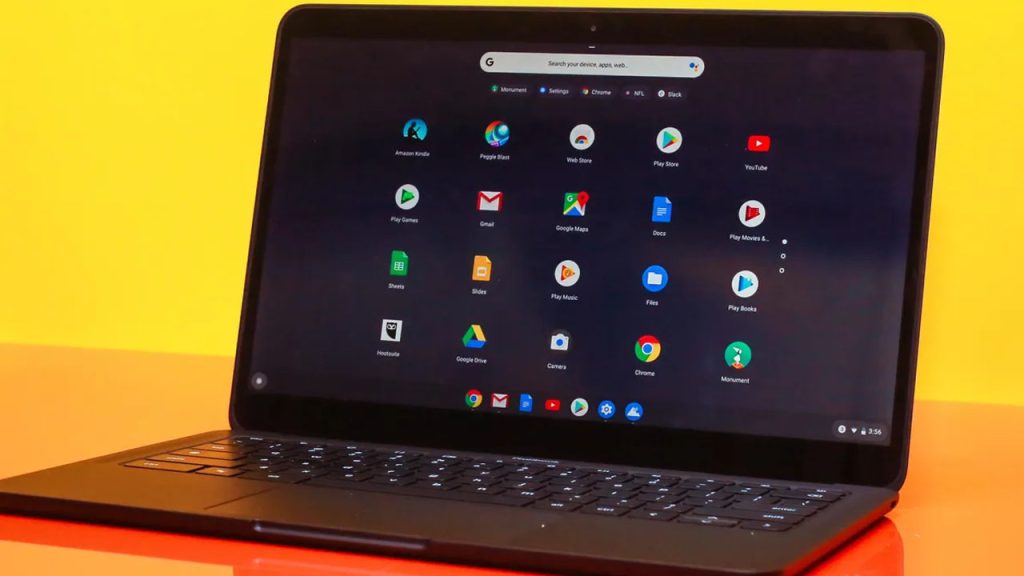
The Google Pixelbook Go is a lightweight and portable Chromebook designed with simplicity and efficiency in mind. It runs Chrome OS, Google’s streamlined operating system, which is known for being easy to use and secure—ideal for school-aged children. The Pixelbook Go boasts a 13.3-inch touchscreen display, making it a great size for both portability and usability. It comes with an Intel Core m3 processor, 8GB of RAM, and 64GB of storage, which is sufficient for most school tasks like browsing, typing documents, and streaming educational videos.
Key Specifications:
- Display: 13.3-inch Full HD touchscreen (1920 x 1080)
- Processor: Intel Core m3 (8th Gen)
- RAM: 8GB
- Storage: 64GB eMMC
- Operating System: Chrome OS
- Battery Life: Up to 12 hours
- Weight: 2.3 pounds (1.04 kg)
Pros
- Excellent Battery Life: With up to 12 hours of battery life, the Pixelbook Go can easily last through a full school day and then some, making it perfect for kids who might forget to charge their devices.
- User-Friendly Operating System: Chrome OS is intuitive and easy for kids to navigate. It’s also very secure, with automatic updates and built-in virus protection.
- Durable and Lightweight Design: The ribbed base of the Pixelbook Go makes it easy for small hands to grip, and at just 2.3 pounds, it’s light enough for kids to carry around without a struggle.
- Quiet Keyboard: The “Hush” keyboard is designed to be quiet, which is great for children who might be easily distracted by loud typing noises.
Cons
- Limited Storage: With only 64GB of storage, the Pixelbook Go might run out of space quickly, especially if your child needs to store large files or downloads apps. However, this can be mitigated by utilizing cloud storage options.
- Lacks Expandable Storage: There’s no option to add additional storage via SD card, which could be a drawback for those who need more space.
- Relatively Expensive for a Chromebook: While it offers solid performance, the Pixelbook Go is priced higher than many other Chromebooks, which could be a concern for budget-conscious parents.
Ideal Use Cases
The Google Pixelbook Go is an excellent choice for children who need a reliable, easy-to-use laptop for everyday school tasks. It’s particularly well-suited for younger students in elementary or middle school who are primarily using web-based applications and don’t require extensive storage. Its long battery life and lightweight design also make it ideal for kids who need to carry their laptops between home and school.
Laptop 2: Lenovo Chromebook Duet
Overview and Key Specs
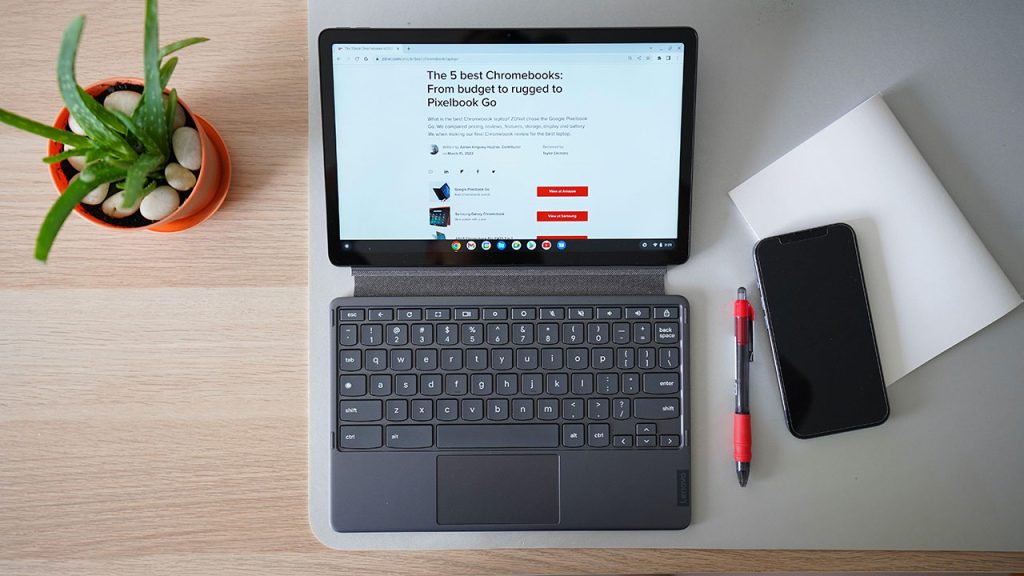
The Lenovo Chromebook Duet is a versatile 2-in-1 device that can function both as a laptop and a tablet, making it a unique option in the Chromebook market. It features a detachable keyboard, which allows kids to easily switch between typing out essays and using it as a touchscreen tablet for reading or drawing. The Duet is powered by a MediaTek Helio P60T processor, paired with 4GB of RAM, and offers 64GB of eMMC storage. While these specs are modest, they’re more than sufficient for the lightweight, web-centric tasks Chromebooks are designed for.
Key Specifications:
- Display: 10.1-inch Full HD touchscreen (1920 x 1200)
- Processor: MediaTek Helio P60T
- RAM: 4GB
- Storage: 64GB eMMC
- Operating System: Chrome OS
- Battery Life: Up to 10 hours
- Weight: 2.03 pounds (0.92 kg) with keyboard attached
Pros
- 2-in-1 Flexibility: The ability to detach the keyboard and use the Duet as a tablet offers great versatility. Kids can easily switch between typing and touch-based activities, which can be particularly beneficial for younger children or those with creative learning styles.
- Affordable Price: The Lenovo Chromebook Duet is one of the most budget-friendly Chromebooks on the market, offering excellent value for its features and versatility.
- Portable and Lightweight: Weighing just over 2 pounds with the keyboard attached, the Duet is incredibly portable, making it easy for kids to carry it around.
- Long Battery Life: With up to 10 hours of battery life, the Duet can comfortably last through a school day on a single charge.
- Keyboard Included: Unlike many tablets that require an additional purchase for a keyboard, the Duet comes with a detachable keyboard, adding to its value.
Cons
- Small Screen Size: The 10.1-inch display might be too small for older students who need to work on more detailed projects or multitask between several windows.
- Limited Performance: The 4GB of RAM and MediaTek processor are sufficient for basic tasks but may struggle with more demanding applications or heavy multitasking.
- Keyboard Comfort: While functional, the detachable keyboard is smaller than a standard laptop keyboard, which might be uncomfortable for longer typing sessions, especially for older kids with larger hands.
Ideal Use Cases
The Lenovo Chromebook Duet is ideal for younger students, particularly those in elementary school, who need a simple, affordable, and versatile device for light schoolwork. Its 2-in-1 design makes it perfect for kids who will benefit from the touchscreen functionality and portability. However, it may not be the best choice for older students who require more screen real estate or more powerful performance for their school tasks.
Laptop 3: Apple MacBook Air (M1, 2020)
Overview and Key Specs
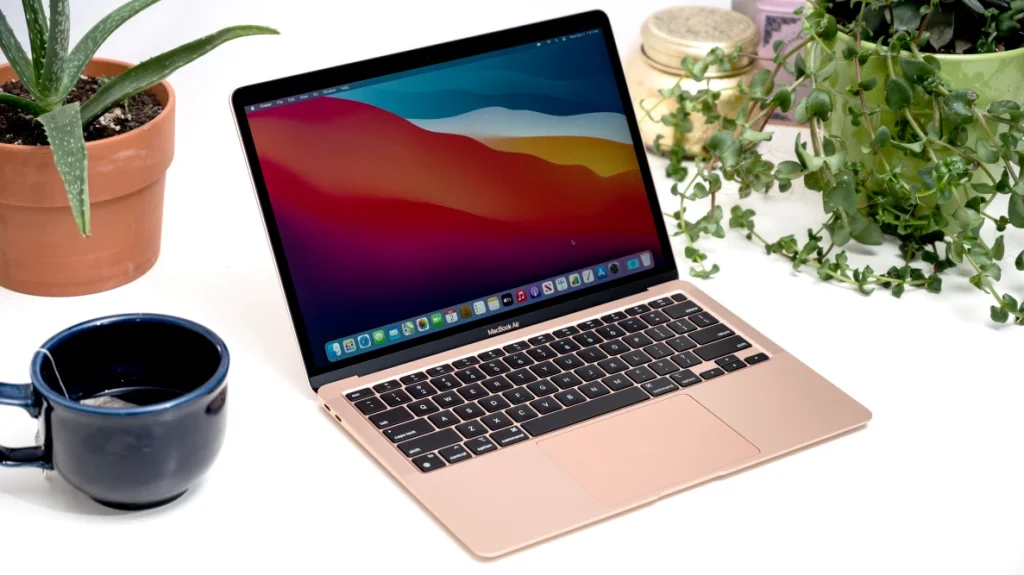
The Apple MacBook Air with the M1 chip, released in 2020, has set a new standard for performance and efficiency in lightweight laptops. While it’s a bit pricier than other options on this list, it offers exceptional power, making it a strong contender for students who need a reliable machine for more demanding school tasks. The MacBook Air features a 13.3-inch Retina display, 8GB of RAM, and a 256GB SSD, with the power of Apple’s M1 chip under the hood. It runs macOS, which offers a seamless user experience, especially for those already within the Apple ecosystem.
Key Specifications:
- Display: 13.3-inch Retina display (2560 x 1600)
- Processor: Apple M1 chip with 8-core CPU
- RAM: 8GB (configurable to 16GB)
- Storage: 256GB SSD (configurable to 512GB or more)
- Operating System: macOS
- Battery Life: Up to 18 hours
- Weight: 2.8 pounds (1.29 kg)
Pros
- Outstanding Performance: The M1 chip delivers incredible speed and efficiency, making this laptop suitable for everything from basic web browsing to more intensive tasks like video editing or running complex simulations.
- Exceptional Battery Life: With up to 18 hours of battery life, the MacBook Air easily lasts through a full day of school and then some, reducing the worry about frequent recharging.
- High-Resolution Display: The 13.3-inch Retina display offers stunning clarity and sharpness, making it excellent for viewing educational content, especially in subjects like art or science.
- Silent Operation: The fanless design means the MacBook Air operates silently, which can be a significant plus in quiet study environments.
- Build Quality: Apple’s build quality is top-notch, with a sleek aluminum body that is both durable and lightweight.
Cons
- High Price Point: The MacBook Air is significantly more expensive than other options on this list, which could be a deterrent for parents looking for a more budget-friendly laptop for their child.
- Limited Port Selection: The MacBook Air has only two USB-C ports, which might require additional adapters for connecting peripherals, a potential inconvenience.
- Not as Durable as Some Competitors: While the build quality is excellent, the MacBook Air is not designed with the same level of ruggedness as some of the more kid-focused laptops on the market.
Ideal Use Cases
The Apple MacBook Air (M1, 2020) is an excellent choice for older students, particularly those in high school or college, who need a powerful and reliable machine for a broad range of tasks. It’s ideal for students who may be engaged in more demanding coursework, such as coding, graphic design, or video editing, and who appreciate the seamless integration with other Apple devices. While it’s more expensive, its performance and long-term value make it a worthwhile investment for serious students.
Laptop 4: Microsoft Surface Laptop Go 2
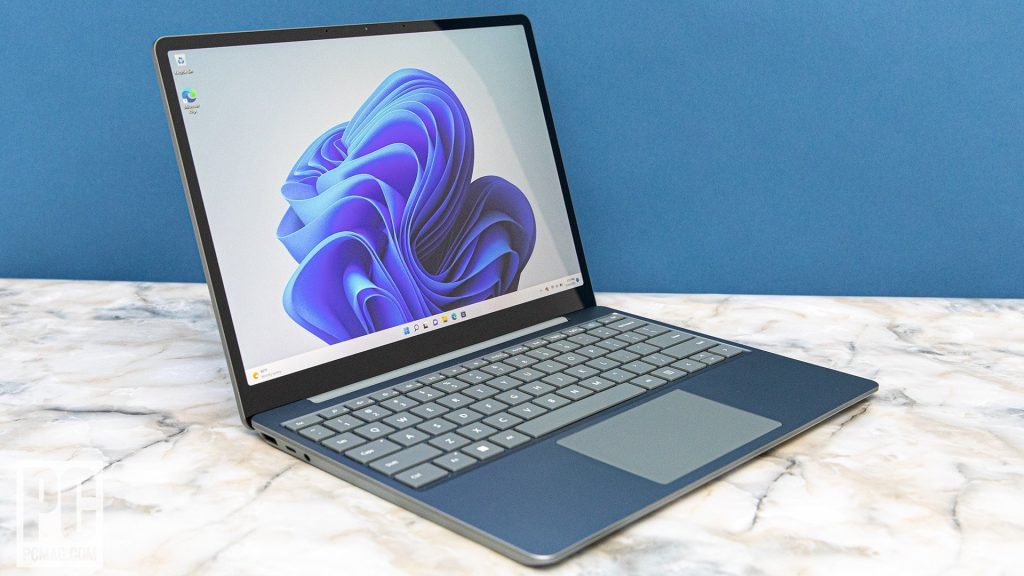
Overview and Key Specs
The Microsoft Surface Laptop Go 2 is a sleek and compact laptop designed to offer a premium feel at a more accessible price point. It combines the portability and design aesthetic of Microsoft’s Surface lineup with a focus on delivering good performance for everyday tasks. The Laptop Go 2 features a 12.4-inch PixelSense touchscreen display, an Intel Core i5 processor, 8GB of RAM, and a 128GB SSD. Running Windows 11, it provides a familiar interface for those accustomed to Windows, making it an excellent choice for school use.
Key Specifications:
- Display: 12.4-inch PixelSense touchscreen (1536 x 1024)
- Processor: Intel Core i5 (11th Gen)
- RAM: 8GB
- Storage: 128GB SSD
- Operating System: Windows 11
- Battery Life: Up to 13.5 hours
- Weight: 2.48 pounds (1.12 kg)
Pros
- Premium Design at an Affordable Price: The Surface Laptop Go 2 offers a stylish and premium design, similar to Microsoft’s higher-end Surface devices, but at a more budget-friendly price.
- Touchscreen Display: The PixelSense touchscreen adds a layer of interactivity, which can be particularly useful for educational apps and activities that benefit from touch input.
- Good Performance: Powered by an 11th Gen Intel Core i5 processor, this laptop handles day-to-day tasks with ease, making it suitable for a wide range of school activities.
- Lightweight and Portable: Weighing just under 2.5 pounds, the Surface Laptop Go 2 is easy to carry around, making it convenient for students who need to move between classes or take their laptop on the go.
- Decent Battery Life: With up to 13.5 hours of battery life, it should last through a full day of school without needing to be recharged.
Cons
- Low-Resolution Display: While the PixelSense display is sharp and responsive, its resolution is lower than many other laptops in this price range, which might be noticeable when watching videos or working on more detailed tasks.
- Limited Storage: With 128GB of SSD storage, students might find themselves running out of space, especially if they need to store a lot of files, applications, or large projects.
- No Backlit Keyboard: The lack of a backlit keyboard might be an inconvenience for students who need to type in low-light conditions.
Ideal Use Cases
The Microsoft Surface Laptop Go 2 is a great option for students who need a lightweight, stylish, and capable laptop for everyday school tasks. It’s particularly well-suited for middle school or high school students who value portability and don’t require the highest-end specs but still want a laptop that performs well for basic computing needs. Its integration with Windows 11 makes it a solid choice for those who prefer the familiarity and versatility of the Windows operating system.
Comparison Table
Below is a side-by-side comparison of the four laptops we've reviewed, highlighting their key features, strengths, and potential drawbacks. This should help you quickly assess which laptop might be the best fit for your child’s needs.
| Feature | Google Pixelbook Go | Lenovo Chromebook Duet | Apple MacBook Air (M1, 2020) | Microsoft Surface Laptop Go 2 |
|---|---|---|---|---|
| Display | 13.3-inch Full HD touchscreen (1920 x 1080) | 10.1-inch Full HD touchscreen (1920 x 1200) | 13.3-inch Retina display (2560 x 1600) | 12.4-inch PixelSense touchscreen (1536 x 1024) |
| Processor | Intel Core m3 (8th Gen) | MediaTek Helio P60T | Apple M1 chip with 8-core CPU | Intel Core i5 (11th Gen) |
| RAM | 8GB | 4GB | 8GB (configurable to 16GB) | 8GB |
| Storage | 64GB eMMC | 64GB eMMC | 256GB SSD (configurable) | 128GB SSD |
| Operating System | Chrome OS | Chrome OS | macOS | Windows 11 |
| Battery Life | Up to 12 hours | Up to 10 hours | Up to 18 hours | Up to 13.5 hours |
| Weight | 2.3 pounds (1.04 kg) | 2.03 pounds (0.92 kg) with keyboard attached | 2.8 pounds (1.29 kg) | 2.48 pounds (1.12 kg) |
| Price | Mid-range | Budget | High-end | Mid-range |
| Pros | Excellent battery life, user-friendly, durable design | Affordable, 2-in-1 flexibility, portable | Outstanding performance, exceptional battery life, high-resolution display | Premium design, touchscreen, good performance |
| Cons | Limited storage, relatively expensive for a Chromebook | Small screen, limited performance, small keyboard | High price, limited port selection, not as rugged | Low-resolution display, limited storage, no backlit keyboard |
| Ideal Use Cases | Elementary & middle school students who need a reliable, easy-to-use laptop | Younger students who benefit from touch functionality and portability | High school & college students needing powerful performance and long battery life | Middle & high school students who want a stylish, portable, and capable Windows laptop |
Which Laptop Is Best for Your Child?
Choosing the right laptop for your child can depend on a variety of factors, such as their age, the type of schoolwork they need to do, and your budget. Below, I’ve provided recommendations based on different scenarios to help you decide which of these four laptops might be the best choice.
1. Best for Younger Students (Elementary School)
Recommended Laptop: Lenovo Chromebook Duet
For younger students, particularly those in elementary school, the Lenovo Chromebook Duet stands out as an excellent choice. Its 2-in-1 design allows kids to use it as both a laptop and a tablet, which can be great for different learning activities. The touch screen can make interactive learning apps more engaging, and the affordable price makes it less of a burden on your wallet. The Duet’s compact size and lightweight design also make it easy for younger children to carry.
Why Choose It?
- Versatile 2-in-1 design.
- Affordable and portable.
- Simple and secure Chrome OS.
2. Best for Middle School Students
Recommended Laptop: Google Pixelbook Go
Middle school students need a bit more power and functionality as their schoolwork becomes more demanding. The Google Pixelbook Go is a fantastic option due to its combination of ease of use, portability, and solid performance. The durable design and excellent battery life ensure that it can withstand the rigors of daily school use. It’s perfect for students who need a reliable device for web-based applications and light computing tasks.
Why Choose It?
- Durable, lightweight, and easy to use.
- Long battery life.
- Great for web-based tasks and school assignments.
3. Best for High School Students
Recommended Laptop: Microsoft Surface Laptop Go 2
High school students often require a more versatile and powerful device that can handle a variety of tasks, from essay writing to more complex projects. The Microsoft Surface Laptop Go 2 offers a great balance between performance, portability, and design. It’s powerful enough to run multiple applications at once, thanks to its Intel Core i5 processor, and the touchscreen adds another layer of usability. Plus, its stylish design is sure to appeal to teenagers.
Why Choose It?
- Sleek, premium design at a mid-range price.
- Good performance for multitasking.
- Touchscreen adds flexibility.
4. Best for College Students
Recommended Laptop: Apple MacBook Air (M1, 2020)
For college students who might be dealing with more intensive tasks—such as coding, graphic design, or video editing—the Apple MacBook Air with the M1 chip is an excellent investment. It offers outstanding performance, incredible battery life, and a high-resolution Retina display, making it perfect for students who need a reliable, long-lasting laptop. The integration with other Apple products is a bonus for those already in the Apple ecosystem, and while it’s more expensive, its power and longevity make it worth the price.
Why Choose It?
- Exceptional performance and battery life.
- High-resolution Retina display.
- Ideal for demanding tasks and long-term use.
Conclusion
When choosing a laptop for your child, it’s important to consider their specific needs and the type of work they’ll be doing. The Lenovo Chromebook Duet is a great starter device for younger children, while the Google Pixelbook Go offers a bit more power for middle schoolers. The Microsoft Surface Laptop Go 2 is ideal for high school students who need a balance of performance and portability, and the Apple MacBook Air is a powerhouse for college students or those engaged in more demanding coursework.
Ultimately, the best laptop for your child depends on their age, the complexity of their schoolwork, and your budget. Any of the laptops reviewed here would be a strong choice, each catering to different educational needs and learning environments.